Click this -->Install Oracle binaries/Software in silent mode (without graphical interface)…………….

Lets start to create Database using DBCA in silent mode
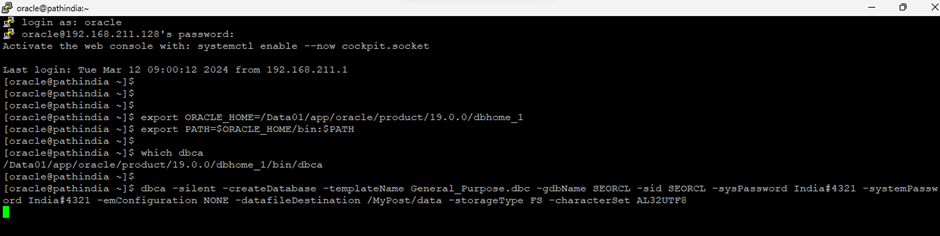
Step-1 First, we need to set the environment as below
export ORACLE_HOME=/Data01/app/oracle/product/19.0.0/dbhome_1
export PATH=$ORACLE_HOME/bin:$PATH
[oracle@pathindia ~]$
Step-2 execute the below command to run DBCA in silent mode
[oracle@pathindia ~]$ dbca -silent -createDatabase -templateName General_Purpose.dbc -gdbName SEORCL -sid SEORCL -sysPassword India#4321 -systemPassword India#4321 -emConfiguration NONE -datafileDestination /MyPost/data -storageType FS -characterSet AL32UTF8
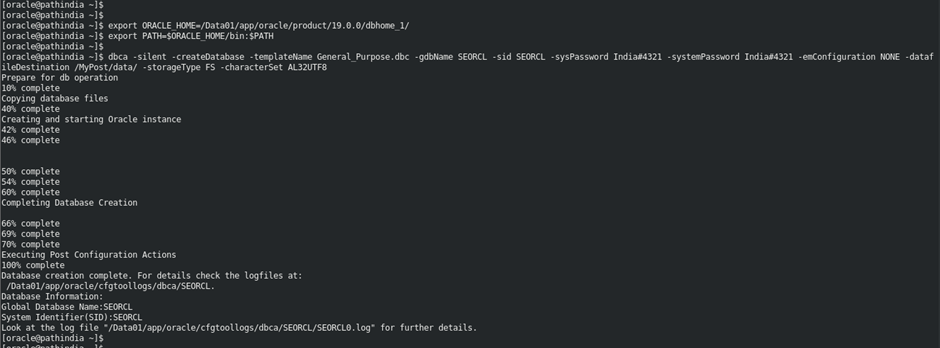
Now,Check the progress of the executed command as below
Check DB and listener is running.

Oracle Database created successfully for Standalone. This is done……………Enjoy and stay connected……..
Caution: It is provided for educational purposes only. It has been tested internally, however, we do not guarantee that it will work for you. Ensure that you run it in your test environment before using.
Thank you,
A. Rawat
Email: 88arawat@gmail.com