Below are the Steps/process to apply the patch to avoid the strange behavior of the OEM Cloud Control
Step-1 Apply Latest patch to the OEM repository database
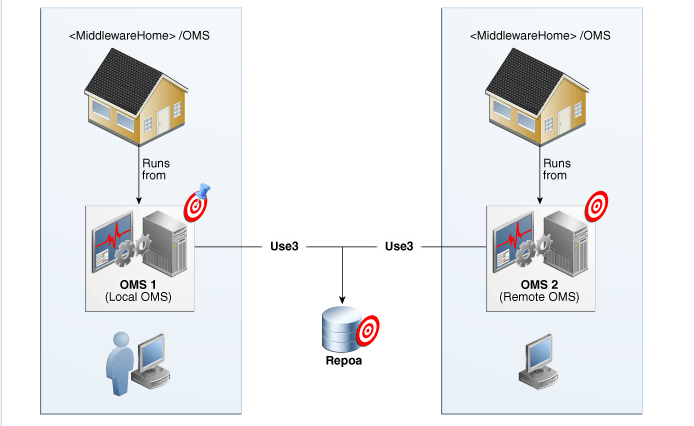
Step-2 Apply the OMS patch to the OMS server
Step-3 Apply the Agent patch to the agents on OEM server
Apply Latest patch to the OEM repository database
Check latest patch list for Oracle Enterprise Manager using Doc ID 2760230.2
set the environment for the repository database
Note:- $ORACLE_HOME is OMS home
We assume Repository database already patched with latest RU patch
[oracle@oemdb ~]$ . oraenv ORACLE_SID = [oracle] ? repodb
The Oracle base has been set to /u01/app/oracle
[oracle@oemdb ~]$ $OMS_HOME/OPatch/opatch lspatches
34419443;Database Release Update : 19.17.0.0.221018 (34419443)
OPatch succeeded.
Check the existing version of our OMS server
[oracle@oemdb 34601305]$ $OMS_HOME/OPatch/opatch lspatches
34065178;One-off
34523462;OHS (NATIVE) BUNDLE PATCH 12.2.1.4.220823
33950717;OPSS Bundle Patch 12.2.1.4.220311
34535558;ADF BUNDLE PATCH 12.2.1.4.220825
34653267;WLS PATCH SET UPDATE 12.2.1.4.220929
1221415;Bundle patch for Oracle Coherence Version 12.2.1.4.15
34430543;Oracle Enterprise Manager for Cloud Framework 13c Release 5 Plug-in Update 10 (13.5.1.10) for Oracle Management Service
34430522;Oracle Enterprise Manager for Systems Infrastructure 13c Release 5 Plug-in Update 10 (13.5.1.10) for Oracle Management Service
34430480;Oracle Enterprise Manager for Exadata 13c Release 5 Plug-in Update 10 (13.5.1.10) for Oracle Management Service
34430441;Oracle Enterprise Manager for Oracle Database 13c Release 5 Plug-in Update 10 (13.5.1.10) for Oracle Management Service
34430435;Oracle Enterprise Manager for Fusion Middleware 13c Release 5 Plug-in Update 10 (13.5.1.10) for Oracle Management Service
34430427;Oracle Enterprise Manager 13c Release 5 Platform Update 10 (13.5.0.10) for Oracle Management Service
31818221;One-off
30152128;One-off
26626168;One-off
OPatch succeeded.
Check the version of omspatcher and update as per requirement on readme file
[oracle@oemdb ~]$ $OMS_HOME/OMSPatcher/omspatcher version
OMSPatcher Version: 13.9.5.8.0
OPlan Version: 12.2.0.1.16
OsysModel build: Fri Mar 08 11:00:31 IST 2024
OMSPatcher succeeded.
Use below steps to replace the omspatcher with latest one using Doc ID 2809842.1
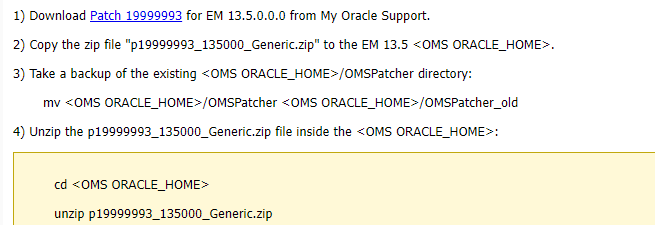
Now check the version of omspatcher utility again
oracle@oemdb OMSPatcher]$ pwd
/u01/app/oracle/product/middleware/OMSPatcher
[oracle@oemdb OMSPatcher]$ ./omspatcher version
OMSPatcher Version: 13.9.5.9.0
OPlan Version: 12.2.0.1.16
OsysModel build: Fri Mar 08 11:10:33 IST 2024
OMSPatcher succeeded.
Now before applying the patch, We should to use the analyze option to know the issues, if any
[oracle@oemdb log]$ cd /u01/app/PATCH/34601305/
[oracle@oemdb 34601305]$ omspatcher apply -analyze
OMSPatcher Automation Tool
Copyright (c) 2017, Oracle Corporation. All rights reserved.
OMSPatcher version : 13.9.5.9.0
OUI version : 13.9.4.0.0
Running from : /u01/app/oracle/product/middleware
Log file location : /u01/app/oracle/product/middleware/cfgtoollogs/omspatcher/opatch2024-03-08_11-41-11AM_1.log
OMSPatcher log file: /u01/app/oracle/product/middleware/cfgtoollogs/omspatcher/34601305/omspatcher_2024-03-08_11-41-11AM_analyze.log
Please enter OMS weblogic admin server URL(t3s://oemdb.corp.sch.ch:7102):>
Please enter OMS weblogic admin server username(weblogic):>
Please enter OMS weblogic admin server password:>
Enter SYS Password :
Checking if current repository database is a supported version
Current repository database version is supported
Prereq “checkComponents” for patch 34601316 passed.
Prereq “checkComponents” for patch 34601404 passed.
Prereq “checkComponents” for patch 34601397 passed.
Prereq “checkComponents” for patch 34601328 passed.
Prereq “checkComponents” for patch 34601338 passed.
Prereq “checkComponents” for patch 34601379 passed.
Configuration Validation: Success
Running apply prerequisite checks for sub-patch(es) “34601338,34601397,34601316,34601379,34601328,34601404” and Oracle Home “/u01/app/oracle/product/middleware”…
Sub-patch(es) “34601338,34601397,34601316,34601379,34601328,34601404” are successfully analyzed for Oracle Home “/u01/app/oracle/product/middleware”
Complete Summary
================
All log file names referenced below can be accessed from the directory “/u01/app/oracle/product/middleware/cfgtoollogs/omspatcher/2024-03-08_11-41-11AM_SystemPatch_34601305_1”
Prerequisites analysis summary:
The following sub-patch(es) are applicable:
Featureset Sub-patches Log file
———- ———– ——–
oracle.sysman.top.oms 34601338,34601397,34601316,34601379,34601328,34601404 34601338,34601397,34601316,34601379,34601328,34601404_opatch2024-03-08_11-41-11AM_1.log
The following sub-patches are incompatible with components installed in the OMS system:
34430473,34430509,34241652,34601358,34601363,34601368,34241548,34601384,34601400
Log file location: /u01/app/oracle/product/middleware/cfgtoollogs/omspatcher/34601305/omspatcher_2024-03-08_11-41-11AM_analyze.log
OMSPatcher succeeded.
We can see that analyze command executed successfully, Now we need to apply the patch
On this step, First we will stop the OMS services
[oracle@oemdb]$ cd /u01/app/oracle/product/middleware/bin
./emctl stop oms
Oracle Enterprise Manager Cloud Control 13c Release 5
Copyright (c) 1996, 2021 Oracle Corporation. All rights reserved.
Stopping Oracle Management Server…
Oracle Management Server Successfully Stopped
Oracle Management Server is Down
JVMD Engine is Down
[oracle@oemdb]$ cd /u01/app/PATCH/34601305/
[oracle@oemdb 34601305]$ omspatcher apply
OMSPatcher Automation Tool
Copyright (c) 2017, Oracle Corporation. All rights reserved.
OMSPatcher version : 13.9.5.9.0
OUI version : 13.9.4.0.0
Running from : /u01/app/oracle/product/middleware
Log file location : /u01/app/oracle/product/middleware/cfgtoollogs/omspatcher/opatch2024-03-08_12-1111AM_1.log
OMSPatcher log file: /u01/app/oracle/product/middleware/cfgtoollogs/omspatcher/34601305/omspatcher_2024-03-08_12-1112AM_apply.log
Please enter OMS weblogic admin server URL(t3s://oemdb.corp.sch.ch:7102):>
Please enter OMS weblogic admin server username(weblogic):>
Please enter OMS weblogic admin server password:>
Enter SYS Password :
Checking if current repository database is a supported version
Current repository database version is supported
Prereq “checkComponents” for patch 34601316 passed.
Prereq “checkComponents” for patch 34601404 passed.
Prereq “checkComponents” for patch 34601397 passed.
Prereq “checkComponents” for patch 34601328 passed.
Prereq “checkComponents” for patch 34601338 passed.
Prereq “checkComponents” for patch 34601379 passed.
Configuration Validation: Success
Running apply prerequisite checks for sub-patch(es) “34601338,34601397,34601316,34601379,34601328,34601404” and Oracle Home “/u01/app/oracle/product/middleware”…
Sub-patch(es) “34601338,34601397,34601316,34601379,34601328,34601404” are successfully analyzed for Oracle Home “/u01/app/oracle/product/middleware”
To continue, OMSPatcher will do the following:
[Patch and deploy artifacts] : Apply sub-patch(es) [ 34601316 34601328 34601338 34601379 34601397 34601404 ]
Apply RCU artifact with patch “/u01/app/oracle/product/middleware/.omspatcher_storage/34601316_Nov_13_2022_22_48_23/original_patch”;
Apply RCU artifact with patch “/u01/app/oracle/product/middleware/.omspatcher_storage/34601404_Nov_13_2022_23_00_11/original_patch”;
Apply RCU artifact with patch “/u01/app/oracle/product/middleware/.omspatcher_storage/34601397_Nov_13_2022_23_00_48/original_patch”;
Apply RCU artifact with patch “/u01/app/oracle/product/middleware/.omspatcher_storage/34601328_Nov_13_2022_22_58_26/original_patch”;
Apply RCU artifact with patch “/u01/app/oracle/product/middleware/.omspatcher_storage/34601338_Nov_13_2022_22_59_28/original_patch”;
Apply RCU artifact with patch “/u01/app/oracle/product/middleware/.omspatcher_storage/34601379_Nov_13_2022_23_00_28/original_patch”;
Register MRS artifact “commands”;
Register MRS artifact “omsPropertyDef”;
Register MRS artifact “jobTypes”;
Register MRS artifact “swlib”;
Register MRS artifact “procedures”;
Register MRS artifact “targetType”;
Register MRS artifact “storeTargetType”;
Register MRS artifact “default_collection”;
Register MRS artifact “systemStencil”;
Register MRS artifact “gccompliance”;
Register MRS artifact “CredstoreMetadata”;
Register MRS artifact “namedQuery”
Do you want to proceed? [y|n]
y
User Responded with: Y
Stopping the OMS…..
Please monitor log file: /u01/app/oracle/product/middleware/cfgtoollogs/omspatcher/2024-03-08_12-11-13AM_SystemPatch_34601305_9/stop_oms_2024-03-08_12-11-13AM.log
…
…
Registering service “namedQuery” with register file “/u01/app/oracle/product/middleware/sysman/metadata/namedQuery/dashboards_named_query.xml” for plugin id as “core”…
Please monitor log file: /u01/app/oracle/product/middleware/cfgtoollogs/omspatcher/2024-03-08_12-11-13AM_SystemPatch_34601305_9/emctl_register_namedQuery_2024-03-08_12-11-51-48AM.log
The job_queue_processes parameter is set to 0 in the repository database. Resetting the job_queue_processes parameter to its original value 120 in the repository database to start the OMS.
Starting the oms
Please monitor log file: /u01/app/oracle/product/middleware/cfgtoollogs/omspatcher/2024-03-08_12-11-51-58AM_SystemPatch_34601305_40/start_oms_2024-03-08_12-11-51-58AM.log
Complete Summary
All log file names referenced below can be accessed from the directory “/u01/app/oracle/product/middleware/cfgtoollogs/omspatcher/2024-03-08_12-11-51-58AM_SystemPatch_34601305_40”
Patching summary:
Binaries of the following sub-patch(es) have been applied successfully:
Featureset Sub-patches Log file
———- ———– ——–
oracle.sysman.top.oms_13.5.0.0.0 34601316,34601328,34601338,34601379,34601397,34601404 34601316,34601328,34601338,34601379,34601397,34601404_opatch2024-03-08_12-11-34-11AM_1.log
The following sub-patches are incompatible with components installed in the OMS system:
34430473,34430509,34241652,34601358,34601363,34601368,34241548,34601384,34601400
Deployment summary:
The following artifact(s) have been successfully deployed:
Artifacts Log file
——— ——–
… SQL rcu_applypatch_original_patch_2024-03-08_12-11-41-53AM.log
… SQL rcu_applypatch_original_patch_2024-03-08_12-11-43-54AM.log
… SQL rcu_applypatch_original_patch_2024-03-08_12-11-44-25AM.log
MRS-CredstoreMetadata emctl_register_CredstoreMetadata_2024-03-08_12-11-51-44AM.log
MRS-namedQuery emctl_register_namedQuery_2024-03-08_12-11-51-48AM.log
Log file location: /u01/app/oracle/product/middleware/cfgtoollogs/omspatcher/34601305/omspatcher_2024-03-08_12-1112AM_apply.log
OMSPatcher succeeded.
[oracle@oemdb 34601305]$
On this step, we will verify the new version of the OMS
[oracle@oemdb 34601305]$ $ORACLE_HOME/OPatch/opatch lspatches
34601404;Oracle Enterprise Manager for Cloud Framework 13c Release 5 Plug-in Update 11 (13.5.1.11) for Oracle Management Service
34601397;Oracle Enterprise Manager for Systems Infrastructure 13c Release 5 Plug-in Update 11 (13.5.1.11) for Oracle Management Service
34601379;Oracle Enterprise Manager for Exadata 13c Release 5 Plug-in Update 11 (13.5.1.11) for Oracle Management Service
34601338;Oracle Enterprise Manager for Oracle Database 13c Release 5 Plug-in Update 11 (13.5.1.11) for Oracle Management Service
34601328;Oracle Enterprise Manager for Fusion Middleware 13c Release 5 Plug-in Update 11 (13.5.1.11) for Oracle Management Service
34601316;Oracle Enterprise Manager 13c Release 5 Platform Update 11 (13.5.0.11) for Oracle Management Service
34065178;One-off
34523462;OHS (NATIVE) BUNDLE PATCH 12.2.1.4.220823
33950717;OPSS Bundle Patch 12.2.1.4.220311
34535558;ADF BUNDLE PATCH 12.2.1.4.220825
34653267;WLS PATCH SET UPDATE 12.2.1.4.220929
1221415;Bundle patch for Oracle Coherence Version 12.2.1.4.15
31818221;One-off
30152128;One-off
26626168;One-off
OPatch succeeded.
Now check if OMS is up and running
[oracle@oemdb 34601305]$ emctl status oms -details
Oracle Enterprise Manager Cloud Control 13c Release 5
Copyright (c) 1996, 2021 Oracle Corporation. All rights reserved.
Console Server Host : oemdb.infopath.com
HTTP Console Port : 7788
HTTPS Console Port : 7803
HTTP Upload Port : 4889
HTTPS Upload Port : 4903
EM Instance Home : /u01/app/oracle/product/gc_inst/em/EMGC_OMS1
OMS Log Directory Location : /u01/app/oracle/product/gc_inst/em/EMGC_OMS1/sysman/log
OMS is not configured with SLB or virtual hostname
Agent Upload is locked.
OMS Console is locked.
Active CA ID: 1
Console URL: https://oemdb.infopath.com:7803/em
Upload URL: https://oemdb.infopath.com:4903/empbs/upload
WLS Domain Information
Domain Name : GCDomain
Admin Server Host : oemdb.infopath.com
Admin Server HTTPS Port: 7102
Admin Server is RUNNING
Oracle Management Server Information
Managed Server Instance Name: EMGC_OMS1
Oracle Management Server Instance Host: oemdb.infopath.com
WebTier is Up
Oracle Management Server is Up
JVMD Engine is Up
Now we will move to, Apply the Agent patch 34639857 using command line on OEM server
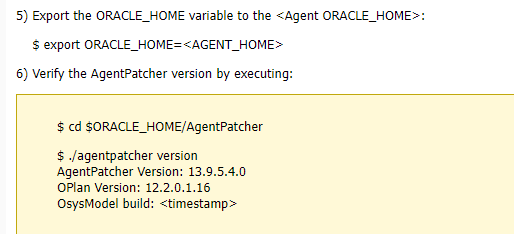
[oracle@oemdb agent_13.5.0.0.0]$ cd AgentPatcher
[oracle@oemdb AgentPatcher]$ ./agentpatcher version
AgentPatcher Version: 13.9.5.4.0
OPlan Version: 12.2.0.1.16
OsysModel build: Fri Mar 08 13:26:01 IST 2024
AgentPatcher succeeded.
Now we need to start the patching of the agent but first Run the analyze command
[oracle@oemdb ~]$ cd /u01/app/PATCH/
[oracle@oemdb PATH]$ cd 34639857/
[oracle@oemdb 34639857]$ agentpatcher apply -analyze
AgentPatcher Automation Tool
Copyright (c) 2021, Oracle Corporation. All rights reserved.
AgentPatcher version : 13.9.5.4.0
OUI version : 13.9.4.0.0
Running from : /u01/app/oracle/product/agent/agent_13.5.0.0.0
Log file location : /u01/app/oracle/product/agent/agent_13.5.0.0.0/cfgtoollogs/agentpatcher/opatch2024-03-08_14-28-21PM_1.log
AgentPatcher log file: /u01/app/oracle/product/agent/agent_13.5.0.0.0/cfgtoollogs/agentpatcher/34639857/agentpatcher_2024-03-08_14-28-21PM_analyze.log
Prereq “checkComponents” for patch 34706936 passed.
Prereq “checkComponents” for patch 33869752 passed.
Prereq “checkComponents” for patch 34471145 passed.
Prereq “checkComponents” for patch 34639846 passed.
Prereq “checkComponents” for patch 34706830 passed.
Prereq “checkComponents” for patch 34706883 passed.
Prereq “checkComponents” for patch 34611829 passed.
Prereq “checkComponents” for patch 34611810 passed.
Prereq “checkComponents” for patch 34158793 passed.
Prereq “checkComponents” for patch 34234448 passed.
Prereq “checkComponents” for patch 33737099 passed.
Running apply prerequisite checks for sub-patch(es) “34706830,33737099,34471145,34611810,34158793,33869752,34706883,34611829,34639846,34706936,34234448” and Oracle Home “/u01/app/oracle/product/agent/agent_13.5.0.0.0″…
Sub-patch(es) “34706830,33737099,34471145,34611810,34158793,33869752,34706883,34611829,34639846,34706936,34234448” are successfully analyzed for Oracle Home “/u01/app/oracle/product/agent/agent_13.5.0.0.0”
Complete Summary
All log file names referenced below can be accessed from the directory “/u01/app/oracle/product/agent/agent_13.5.0.0.0/cfgtoollogs/agentpatcher/2024-03-08_14-28-21PM_SystemPatch_34639857_1”
Prerequisites analysis summary:
The following sub-patch(es) are applicable:
oracle.sysman.top.agent 34706830,33737099,34471145,34611810,34158793,33869752,34706883,34611829,34639846,34706936,34234448 34706830,33737099,34471145,34611810,34158793,33869752,34706883,34611829,34639846,34706936,34234448_opatch2024-03-08_14-28-24PM_1.log
The following sub-patches are incompatible with components installed in the Agent system:
34611842,32968787,34471036,33715858,34471072,34541981,34706900,34471095,33586851,34158650,34024065
++++++++++++++++++++++++++++++++++++++++++++++++++++++++++++++++++++++++++++++++
The following patches could not be applied during OPatch execution:
Patch Reason
* *
34611842 The Plugin or Core Component “oracle.sysman.am.agent.plugin with version 13.5.1.0.0” for which the patch is intended is not deployed in your Enterprise Manager system.
32968787 The Plugin or Core Component “oracle.sysman.bda.discovery.plugin with version 13.5.1.0.0” for which the patch is intended is not deployed in your Enterprise Manager system.
34471036 The Plugin or Core Component “oracle.sysman.empa.discovery.plugin with version 13.5.1.0.0” for which the patch is intended is not deployed in your Enterprise Manager system.
33715858 The Plugin or Core Component “oracle.sysman.bda.agent.plugin with version 13.5.1.0.0” for which the patch is intended is not deployed in your Enterprise Manager system.
34471072 The Plugin or Core Component “oracle.sysman.empa.agent.plugin with version 13.5.1.0.0” for which the patch is intended is not deployed in your Enterprise Manager system.
34541981 The Plugin or Core Component “oracle.sysman.vt.agent.plugin with version 13.5.1.0.0” for which the patch is intended is not deployed in your Enterprise Manager system.
34706900 The Plugin or Core Component “oracle.sysman.xa.agent.plugin with version 13.5.1.0.0” for which the patch is intended is not deployed in your Enterprise Manager system.
34471095 The Plugin or Core Component “oracle.sysman.vi.agent.plugin with version 13.5.1.0.0” for which the patch is intended is not deployed in your Enterprise Manager system.
33586851 The Plugin or Core Component “oracle.sysman.emfa.discovery.plugin with version 13.5.1.0.0” for which the patch is intended is not deployed in your Enterprise Manager system.
34158650 The Plugin or Core Component “oracle.sysman.emfa.agent.plugin with version 13.5.1.0.0” for which the patch is intended is not deployed in your Enterprise Manager system.
34024065 The Plugin or Core Component “oracle.sysman.vi.discovery.plugin with version 13.5.1.0.0” for which the patch is intended is not deployed in your Enterprise Manager system.
++++++++++++++++++++++++++++++++++++++++++++++++++++++++++++++++++++++++++++++++
Log file location: /u01/app/oracle/product/agent/agent_13.5.0.0.0/cfgtoollogs/agentpatcher/34639857/agentpatcher_2024-03-08_14-28-21PM_analyze.log
AgentPatcher succeeded.
Now we can see everything is fine then Stop the agent and Apply the Agent patch as below snap
[oracle@oemdbcd ~] cd /u01/app/PATCH/34639857
[oracle@oemdb 34639857]$ emctl stop agent
Oracle Enterprise Manager Cloud Control 13c Release 5
Copyright (c) 1996, 2021 Oracle Corporation. All rights reserved.
Agent is Not Running
[oracle@oemdb 34639857]$
[oracle@oemdb 34639857]$
[oracle@oemdb 34639857]$ agentpatcher apply
AgentPatcher Automation Tool
Copyright (c) 2021, Oracle Corporation. All rights reserved.
AgentPatcher version : 13.9.5.4.0
OUI version : 13.9.4.0.0
Running from : /u01/app/oracle/product/agent/agent_13.5.0.0.0
Log file location : /u01/app/oracle/product/agent/agent_13.5.0.0.0/cfgtoollogs/agentpatcher/opatch2024-03-08_16-31-28PM_1.log
AgentPatcher log file: /u01/app/oracle/product/agent/agent_13.5.0.0.0/cfgtoollogs/agentpatcher/34639857/agentpatcher_2024-03-08_16-31-29PM_deploy.log
Prereq “checkComponents” for patch 34706936 passed.
Prereq “checkComponents” for patch 33869752 passed.
Prereq “checkComponents” for patch 34471145 passed.
Prereq “checkComponents” for patch 34639846 passed.
Prereq “checkComponents” for patch 34706830 passed.
Prereq “checkComponents” for patch 34706883 passed.
Prereq “checkComponents” for patch 34611829 passed.
Prereq “checkComponents” for patch 34611810 passed.
Prereq “checkComponents” for patch 34158793 passed.
Prereq “checkComponents” for patch 34234448 passed.
Prereq “checkComponents” for patch 33737099 passed.
Running apply prerequisite checks for sub-patch(es) “34706830,33737099,34471145,34611810,34158793,33869752,34706883,34611829,34639846,34706936,34234448” and Oracle Home “/u01/app/oracle/product/agent/agent_13.5.0.0.0″…
Sub-patch(es) “34706830,33737099,34471145,34611810,34158793,33869752,34706883,34611829,34639846,34706936,34234448” are successfully analyzed for Oracle Home “/u01/app/oracle/product/agent/agent_13.5.0.0.0”
To continue, AgentPatcher will do the following:
[Patch and deploy artifacts] :
Do you want to proceed? [y|n]
y
User Responded with: Y
Applying sub-patch(es) “33737099,33869752,34158793,34234448,34471145,34611810,34611829,34639846,34706830,34706883,34706936”
Please monitor log file: /u01/app/oracle/product/agent/agent_13.5.0.0.0/cfgtoollogs/opatch/opatch2024-03-08_16-31-31PM_1.log
Complete Summary
All log file names referenced below can be accessed from the directory “/u01/app/oracle/product/agent/agent_13.5.0.0.0/cfgtoollogs/agentpatcher/2024-03-08_16-31-28PM_SystemPatch_34639857_1”
Patching summary:
Binaries of the following sub-patch(es) have been applied successfully:
oracle.sysman.top.agent_13.5.0.0.0 33737099,33869752,34158793,34234448,34471145,34611810,34611829,34639846,34706830,34706883,34706936 33737099,33869752,34158793,34234448,34471145,34611810,34611829,34639846,34706830,34706883,34706936_opatch2024-03-08_16-31-31PM_1.log
The following sub-patches are incompatible with components installed in the Agent system:
34611842,32968787,34471036,33715858,34471072,34541981,34706900,34471095,33586851,34158650,34024065
++++++++++++++++++++++++++++++++++++++++++++++++++++++++++++++++++++++++++++++++
The following patches could not be applied during OPatch execution:
Patch Reason
* *
34611842 The Plugin or Core Component “oracle.sysman.am.agent.plugin with version 13.5.1.0.0” for which the patch is intended is not deployed in your Enterprise Manager
…
…
34024065 The Plugin or Core Component “oracle.sysman.vi.discovery.plugin with version 13.5.1.0.0” for which the patch is intended is not deployed in your Enterprise Manager system.
++++++++++++++++++++++++++++++++++++++++++++++++++++++++++++++++++++++++++++++++
Log file location: /u01/app/oracle/product/agent/agent_13.5.0.0.0/cfgtoollogs/agentpatcher/34639857/agentpatcher_2024-03-08_16-31-29PM_deploy.log
AgentPatcher succeeded.
On this last step, we will start the agent and use the lspatches command to check the patch history
[oracle@oemdb 34639857]$ emctl start agent
Oracle Enterprise Manager Cloud Control 13c Release 5
Copyright (c) 1996, 2021 Oracle Corporation. All rights reserved.
Starting agent ……………. started.
[oracle@oemdb 34639857]$ agentpatcher lspatches
We have successfully applied the patch on OEM/OMS and Agent as well. …….Thank you….enjoy and stay connected
Next-> Brief introduction on OMSPatcher for OEM Cloud Control 13c
Caution: It is provided for educational purposes only. It has been tested internally, however, we do not guarantee that it will work for you. Ensure that you run it in your test environment before using.
Thank you,
A. Rawat
Email: 88arawat@gmail.com