
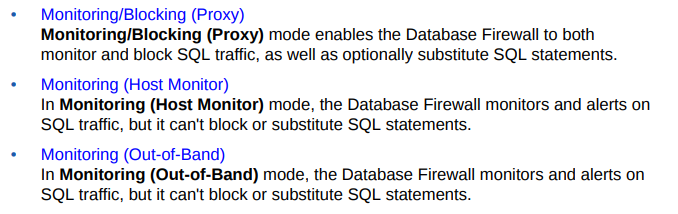
The following are the Database Firewall deployment types:
- Monitoring (Out-of-Band)
- Monitoring (Host Monitor)
- Monitoring / Blocking (Proxy)
Here we are adding Proxy port to use Monitoring/Blocking(Proxy)
Step-1 Login to the AVDF GUI console using ADMIN user

Step-2 Click on Database Firewalls tab marked as red color as shown in below snap

Step-3 Click on Database Firewalls marked as black color as below snap
Apologies:- Snaps are blur due to security reasons.

Step-4 On this page, Click on Network setting marked red color as below snap

Step-5 Click on network Interface card with marked as red color for Example

Step-6 Provide below name of Network Interface Card and Click on ADD button

Step-7 For example, Provide the details as below and SAVE

After save the changes, Check below status and close this.
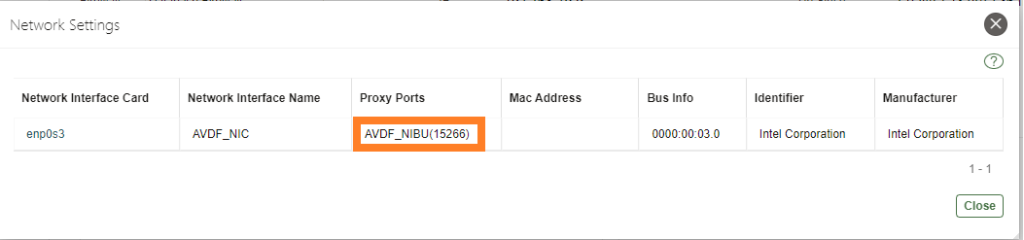
Step-8 On the last, Please add target Database with Firewall using Blocking Mode.
Next:- Create Firewall policy to block User's IP to access the target Databases

Configure the AVDF with below related articles: –
- What is Oracle AVDF?
- What are the main Components of Oracle AVDF?
- Why we need Oracle AVDF in our organization?
- What are the requirement to install Oracle AVDF?
- How to download software Oracle AVDF 20.7/20.8/20.9/20.10?
- How to install Oracle Audit Vault 20.7/20.8/20.9/20.10?
- How to setup the GUI console for Audit Vault Server?
- Mandatory Post-Install Configuration Tasks of AVDF
- How to install Oracle Database Firewall 20.6/20.7/20.8/20/9/20.10?
- How to Register the Database firewall on AVDF GUI console?
- Configure/Add the Target Databases on AVDF to monitor
- Configure the mail-id to get the Alert or Notification on mail
- Add Audit Data Collection/Capturing for target Database
- How to add Blocking/Proxy port for DB Firewall to use Blocking Mode?
- Create Firewall policy to block User’s IP to access the target Databases
Caution: It is provided for educational purposes only. It has been tested internally, however, we do not guarantee that it will work for you. Ensure that you run it in your test environment before using.
Thank you,
A. Rawat
Email: 88anilrawat@gmail.com
Pingback:How to install Oracle Audit Vault 20.6/20.7/20.8/20/9 – SYS oracle
Pingback:Configure the mail-id to get the Alert or Notification on mail – SYS oracle
Pingback:Add Audit Data Collection/Capturing for target Database – SYS oracle
Pingback:Secure your Database with Oracle AVDF 20.6/20.7/20.8/20.9/20.10 – SYS oracle
Pingback:What is Oracle AVDF – SYS oracle
Pingback:Why we need Oracle AVDF in our organization? – SYS oracle
Pingback:What are the requirement to install Oracle AVDF – SYS oracle
Pingback:How to download software Oracle AVDF 20.8 – SYS oracle
Pingback:How to setup the GUI console for Audit Vault Server? – SYS oracle