
Oracle Audit Vault and Database Firewall (AVDF) is a scalable, flexible database activity monitoring (DAM) system that consolidates audit data from databases, operating systems, directories, file systems, and applications into a single repository for analysis, alerting, and reporting.
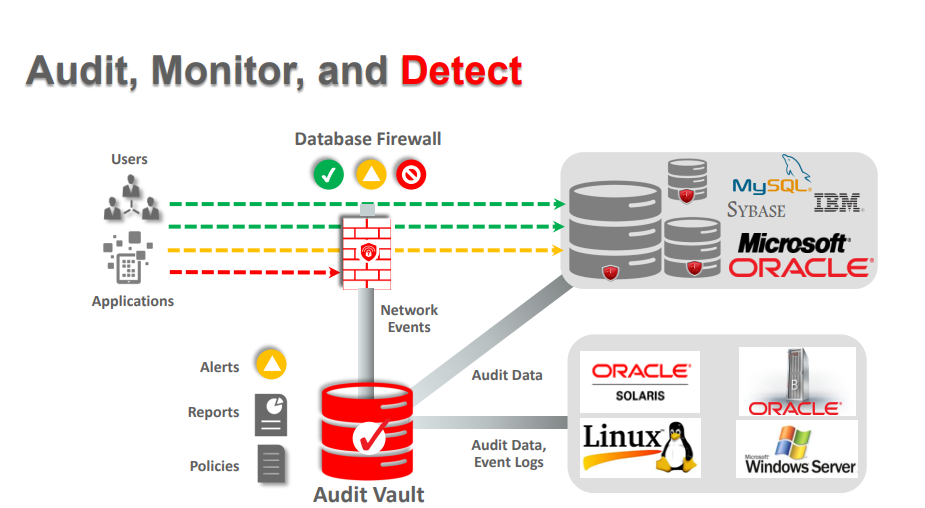
AVDF also monitors SQL statements submitted to the database over the network, and can examine, allow, log, and even block unauthorized SQL statements.
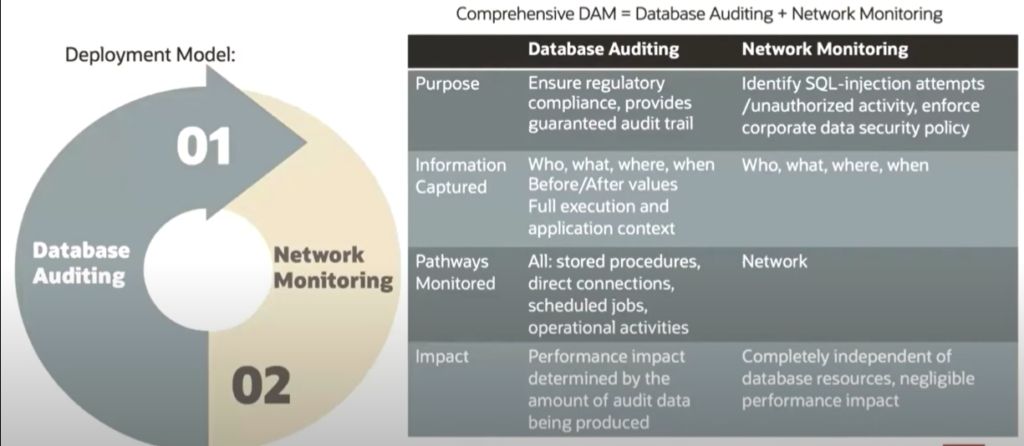
Database Activity Monitoring (DAM) is a database security technology that collects information from native database audit and network-based data capture to monitor and record database activity for analysis and reporting.
DAM is a critical part of securing data in a relational database, providing visibility into potentially malicious activity when preventive controls fail.
DAM=Database Auditing + Network Monitoring
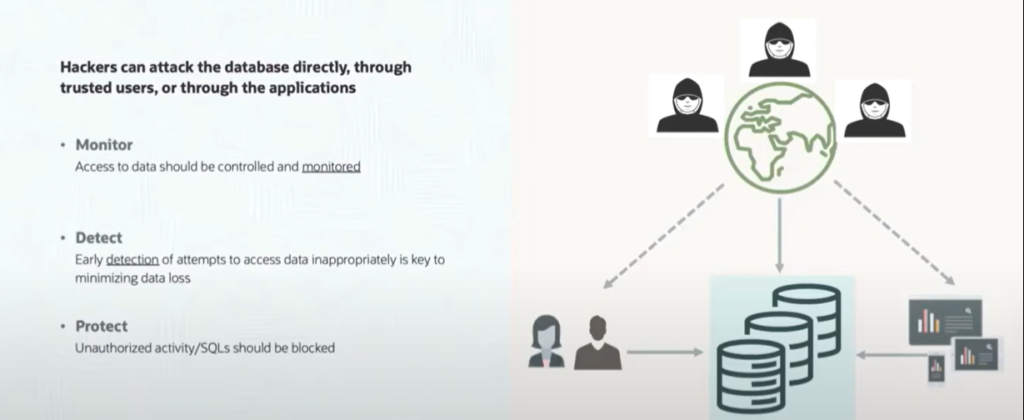
Another important technology used to protect relational databases is the database firewall.
Database firewalls monitor and evaluate incoming SQL commands, identifying and alerting on out-of-policy operations. When appropriate, a database firewall can be used to block out-of-policy SQL from reaching the database at all.
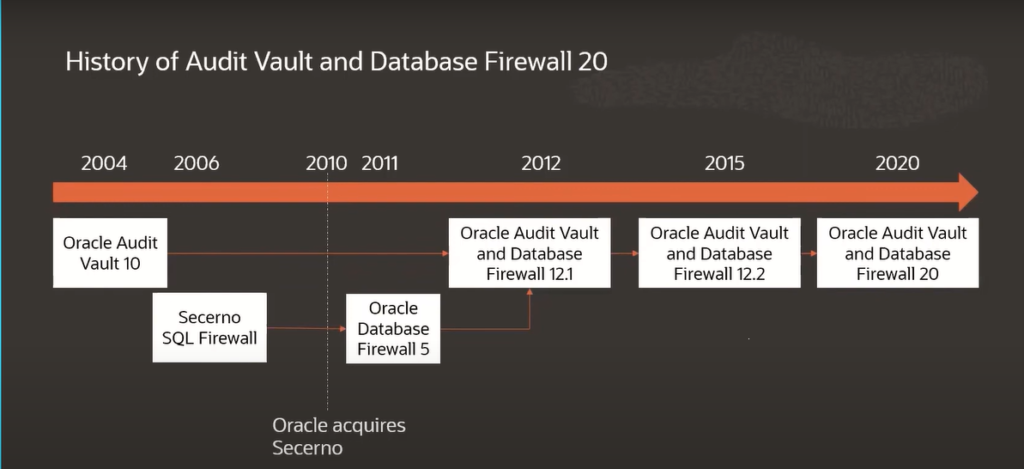
Oracle Audit Vault and Database Firewall combines both technologies in a single product. Audit Vault and Database Firewall was first introduced in 2012, merging two existing products – Oracle Audit Vault and Oracle Database Firewall – into a single unified offering that, for the first time, took advantage of the synergy between native database audit and network-based activity monitoring to provide a comprehensive view of database activity.
Major tasks performing by Oracle AVDF
Which target types and versions are supported by AVDF?
AVDF supports Oracle Database, Microsoft SQL Server, MySQL, IBM Db2, PostgreSQL, SAP Sybase, MongoDB, and operating system logs for Linux, Windows, Solaris, and AIX. AVDF also supports audit trails written to files in XML, CSV, and JSON format. You can use custom collectors to collect the audit logs and send them to the audit vault server for all the other targets where audit trails are written to database tables.
Below are the important points need to read to understand the AVDF.
Point:-1 AVDF includes extensive reporting capabilities using a simple filter-based reporting interface that allows quick drill-down to relevant information.
Point:-2 With AVDF, a single system can monitor activity across thousands of databases, providing a single console from which to report and analyze security events throughout the database estate – including supporting infrastructure.
Point:-3 Oracle Audit Vault and Database Firewall supports common enterprise-class databases. Out-of-box audit collection support includes Oracle Database, Oracle MySQL, Microsoft SQL Server, SAP Sybase, IBM Db2 LUW, and PostgreSQL.
Point:-4 Support for most other databases and applications is possible using the included custom connector framework which collects data via JDBC or RESTful API.
Point:-5 Custom collection is also possible from systems that write audit data to XML or JSON files.
Point:-6 A Java-based software development kit (SDK) is included to accommodate those rare targets that cannot be accessed using any of the custom connector framework options.
Starting of Oracle AVDF from Audit Vault to AVDF 20.10
ORACLE AUDIT VAULT AND DATABASE FIREWALL COMPONENTS
Oracle Audit Vault and Database Firewall (AVDF) provides a comprehensive and flexible solution for monitoring and protecting database systems. AVDF is composed of four primary components:
- Audit vault server
- Audit vault agent
- Database firewall
- Host monitor
NEW IN ORACLE AUDIT VAULT AND DATABASE FIREWALL RELEASE 20AVDF 20 is the culmination of a multi-year update to AVDF, with a brand-new user interface, extended coverage for new databases, updates to the underlying infrastructure, a completely new architecture for collecting before and after values, and lots more.
User Interface
Oracle upgraded the user interface engine to give you modern, responsive, and intuitive look-and-feel. The UI is simplified and optimized for common workflows and easier navigation. Both the audit vault server and the database firewall can be managed from the same console – centralizing the administrative activities and reducing the number of consoles that need to be monitored.
Coverage for New Database Types
Prior to AVDF 20, we supported Oracle Database, Oracle MySQL, Microsoft SQL Server, SAP Sybase, and IBM Db2 LUW. The custom collector framework allowed you to add other databases that produced audit data in XML format or wrote their audit trails to a database table that could be accessed via JDBC.
AVDF 20 adds out-of-box support for PostgreSQL, and our custom collector framework is extended to support JSON data files and audit trails that are accessible via RESTful APIs.
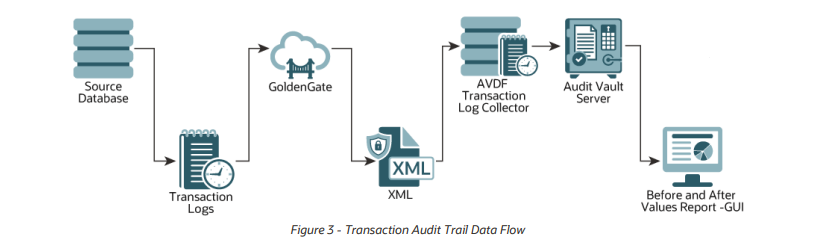
Before and After Value Collection
Before and after value collection is just what it sounds like. If a data value is changed, AVDF records the old value (before the change) and the new value (after the change), along with who changed it and when it was changed. Before and after value collection is extensively used in the healthcare and financial services industry, as well as many other regulated industries.
With before and after value collection, auditors can track the lifecycle of individual data attributes throughout changes – an important component of many data governance requirements.
Previous versions of AVDF used Oracle Streams to gather before and after values, but Oracle Streams does not support Oracle Multitenant, is not capable of working with non-Oracle databases, and is no longer supported with newer Oracle Database versions like 19c.
AVDF 20 includes Oracle Golden Gate, and shifts to using Oracle Golden Gate for before and after value collection.
Using Golden Gate brings a lot of advantages, including improved throughput, easier administration, support for multi-tenant databases, and support for Oracle Database 19c.
Next -> What are the main Components of Oracle AVDF?

Configure the AVDF with below related articles: –
- What is Oracle AVDF?
- What are the main Components of Oracle AVDF?
- Why we need Oracle AVDF in our organization?
- What are the requirement to install Oracle AVDF?
- How to download software Oracle AVDF 20.x ?
- How to install Oracle Audit Vault 20.x ?
- How to setup the GUI console for Audit Vault Server?
- Mandatory Post-Install Configuration Tasks of AVDF
- How to install Oracle Database Firewall 20.x ?
- How to Register the Database firewall on AVDF GUI console?
- Configure/Add the Target Databases on AVDF to monitor
- Configure the mail-id to get the Alert or Notification on mail
- Add Audit Data Collection/Capturing for target Database
- How to add Blocking/Proxy port for DB Firewall to use Blocking Mode?
- Create Firewall policy to block User’s IP to access the target Databases
Caution: It is provided for educational purposes only. It has been tested internally, however, we do not guarantee that it will work for you. Ensure that you run it in your test environment before using.
Thank you,
A Rawat
Email: 88arawat@gmail.com
Pingback:40 Years of the Oracle Invention – SYS oracle
Pingback:What are the main Components of Oracle AVDF ? – SYS oracle
Pingback:Why we need Oracle AVDF in our organization? – SYS oracle
Pingback:What are the requirement to install Oracle AVDF – SYS oracle
Pingback:How to download software Oracle AVDF 20.8 – SYS oracle
Pingback:How to setup the GUI console for Audit Vault Server? – SYS oracle
Pingback:How to Register the Database firewall on AVDF GUI console? – SYS oracle
Pingback:Configure the mail-id to get the Alert or Notification on mail – SYS oracle
Good bro keep the good work
Pingback:Configure/Add the Target Databases on AVDF to monitor – SYS oracle
Pingback:Install Oracle Database Firewall 20.6/20.7/20.8/20/9? – SYS oracle
Pingback:How to install Oracle Audit Vault 20.6/20.7/20.8/20/9 – SYS oracle
Pingback:Mandatory Post-Install Configuration Tasks of AVDF – SYS oracle
Pingback:Add Audit Data Collection/Capturing for target Database – SYS oracle
Pingback:How to add Blocking/Proxy port for DB Firewall – SYS oracle
Pingback:Secure your Database with Oracle AVDF 20.6/20.7/20.8/20.9/20.10 – SYS oracle
Pingback:40 Years of Oracle invention – SYS oracle
Your good knowledge and kindness in playing with all the pieces were very useful. I don’t know what I would have done if I had not encountered such a step like this.
Nice to learn AVDF keep it up bro.