We have to Register the Database firewall on AVDF GUI console, once we installed the Firewall server using How to install Oracle Database Firewall 20.x?
Use this procedure to register an Database Firewall with the Audit Vault Server.
Step-1 Log in to the Audit Vault Server console as an administrator
Apologies:- Snaps are blur due to security reasons.

Step-2 Click Settings tab –> then Click on Security tab in the left navigation menu.

Apologies:- Snaps are blur due to security reasons.

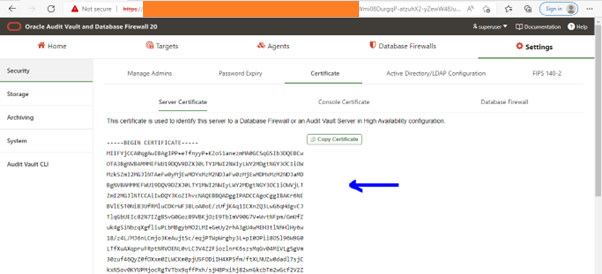
Step-3 Click on Certificate tab in the main page, and click on Server Certificate sub tab.
Apologies:- Snaps are blur due to security reasons.

Step-4 The server’s certificate is displayed then Copy the server’s certificate.
Important: - Copy the certificate from Audit Vault server to Database Firewall server – create a file ca.crt on Audit Vault Server and scp to Database Firewall server as the support OS user
Step-5 Connect to the Audit Vault server through SSH

Step-5 Check the certificate again as below

Step-6 Copy the certificate from Audit Vault server to Database Firewall server – create a file ca.crt on Audit Vault Server and scp to Database Firewall server as the support OS user

Step-7 Connect to the Database Firewall server through SSH
Apologies:- Snaps are blur due to security reasons.

Step-8 Connect as root user on Database Firewall server and execute the config-avs script providing the IP address of the Audit Vault server and the location of the certificate file copied from the Audit Vault server

Step-9 From root user Run these commands to associate the primary or secondary Audit Vault Server for the Database Firewall:
To display the Audit Vault Servers paired with the Database Firewall
/opt/avdf/config-utils/bin/config-avs show
To add or update the primary Audit Vault Server for the Database Firewall
/opt/avdf/config-utils/bin/config-avs set avs=primary address=<Ip address of the primary AVS> certificate=<Path of the certificate>

Step-10 Check the certificate now on the DBFW server as below
Apologies:- Snaps are blur due to security reasons.

Step-11 Login to the Audit Vault Console using ADMIN user as below snap

Step-12 Click on database Firewall tab as marked as blue color
Apologies:- Snaps are blur due to security reasons.

Step-13 Click on Register and Enter the IP address of the Database Firewall server


Step-14 Firewall server has been registered on AVDF console and Below is the status

Next -> Configure/Add the Target Databases on AVDF to monitor?

Configure the AVDF with below related articles: –
- What is Oracle AVDF?
- What are the main Components of Oracle AVDF?
- Why we need Oracle AVDF in our organization?
- What are the requirement to install Oracle AVDF?
- How to download software Oracle AVDF 20.7/20.8/20.9/20.10?
- How to install Oracle Audit Vault 20.7/20.8/20.9/20.10?
- How to setup the GUI console for Audit Vault Server?
- Mandatory Post-Install Configuration Tasks of AVDF
- How to install Oracle Database Firewall 20.6/20.7/20.8/20/9/20.10?
- How to Register the Database firewall on AVDF GUI console?
- Configure/Add the Target Databases on AVDF to monitor
- Configure the mail-id to get the Alert or Notification on mail
- Add Audit Data Collection/Capturing for target Database
- How to add Blocking/Proxy port for DB Firewall to use Blocking Mode?
- Create Firewall policy to block User’s IP to access the target Databases
Caution: It is provided for educational purposes only. It has been tested internally, however, we do not guarantee that it will work for you. Ensure that you run it in your test environment before using.
Thank you,
A. Rawat
Email: 88arawat@gmail.com
Pingback:Install Oracle Database Firewall 20.6/20.7/20.8/20/9? – SYS oracle
Pingback:How to install Oracle Audit Vault 20.6/20.7/20.8/20/9 – SYS oracle
Pingback:What is Oracle AVDF – SYS oracle
Pingback:Configure/Add the Target Databases on AVDF to monitor – SYS oracle
Pingback:How to setup the GUI console for Audit Vault Server? – SYS oracle
Pingback:Configure the mail-id to get the Alert or Notification on mail – SYS oracle
Pingback:Add Audit Data Collection/Capturing for target Database – SYS oracle
Pingback:How to add Blocking/Proxy port for DB Firewall – SYS oracle
Pingback:What are the requirement to install Oracle AVDF – SYS oracle
Pingback:How to download software Oracle AVDF 20.8 – SYS oracle
Pingback:Why we need Oracle AVDF in our organization? – SYS oracle
Pingback:Mandatory Post-Install Configuration Tasks of AVDF – SYS oracle
Pingback:Secure your Database with Oracle AVDF 20.6/20.7/20.8/20.9/20.10 – SYS oracle