Oracle Audit Vault and Database Firewall (AVDF) provides a comprehensive and flexible solution for monitoring and protecting database systems. AVDF is composed of four primary components:
- Audit vault server
- Audit vault agent
- Database firewall
- Host monitor
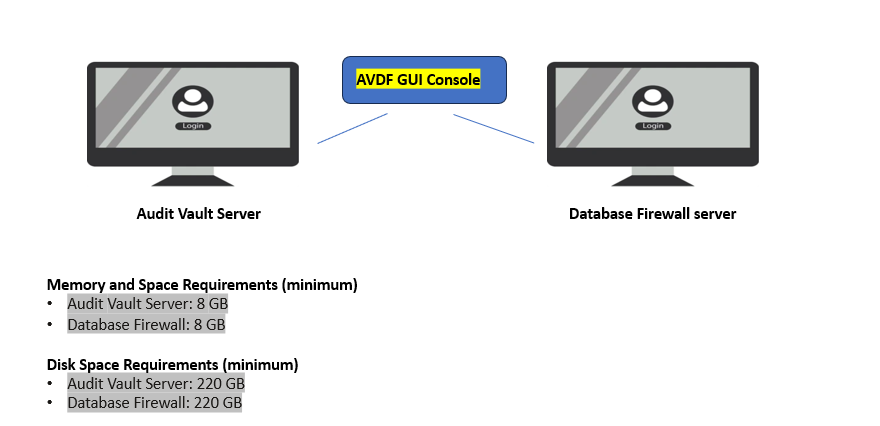
Audit Vault Server
The audit vault server is a mandatory component of AVDF. Any AVDF installation will have at least one audit vault server.
This server comprises a hardened Oracle Linux operating system, Oracle Database which servers as the audit repository, and the Audit Vault and Database Firewall application which provides the interface for the AVDF console and the AVCLI command-line interface.
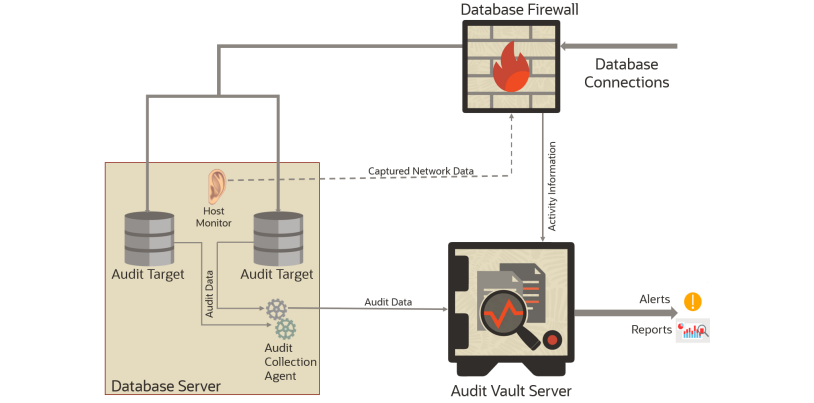
Oracle Audit Vault and Database Firewall consolidates data from audit targets including Oracle and non-Oracle databases, operating systems, directories, file systems, as well as application specific audit data. This data is collected from audit targets and loaded into the audit repository, an Oracle Database which resides on the audit vault server.
The audit repository database is encrypted (using Oracle Transparent Data Encryption) and protected with Oracle Database Vault.
Audit Vault Agent
An audit vault agent is used to retrieve audit data from audit targets and securely forward that data to the Audit Vault server.
A single audit vault agent can collect data from multiple targets and audit trails. The audit vault agent is lightweight, consuming little in the way of CPU, memory, or disk space. Communications between the audit vault agent and the audit vault server use TLS 1.2.
Database Firewall
The database firewall monitors network activity being sent to the database and examines SQL statements before they reach the database.
A database firewall policy governs what is done with those SQL statements – the database firewall may pass them on to the database with no further action or forward information about them to the audit vault server for entry into the audit repository. If the database firewall is configured in-line with that traffic (acting as a database proxy server) then the firewall can also block SQL statements from ever reaching the target database or substitute a replacement SQL command for the blocked statement. The database firewall uses a multi-stage policy to determine what to do with an SQL statement.
In the first stage, the policies examine the originating connection’s IP address, operating system username, program being used to connect to the database, and the database account being used for the connection. The firewall can be configured to allow connections that meet conditions based on these factors, log them for later examination, or (if in-line) block them.
The next stage is based on the SQL statement’s structure, with pass/log/block actions based on the statement’s syntax. This type of policy is an excellent way to block or alert on SQL Injection attacks.
The third stage is based on the table/views being accessed and the operations being performed (e.g.: insert/update/delete).
The fourth stage is the anomaly stage – any SQL statement not handled in any of the three previous stages is handled by this policy.
You might think of it as the “else” phrase in a case statement. Any SQL statement that reaches the fourth stage will be passed/logged/blocked depending on the settings in this portion of the firewall policy.
Host Monitor
Host monitors are remote sensors for the database firewall. A host monitor is installed on the same server as the audit target and monitors incoming network traffic for the database.
Host monitors can only be used to monitor traffic, so blocking actions are not possible. Anything captured by the host monitor is forwarded to the database firewall for analysis according the target’s policy on that firewall, with logged SQL statements forwarded to the audit vault server for insertion into the audit repository.
Next->Why we need Oracle AVDF in our organization?

Configure the AVDF with below related articles: –
- What is Oracle AVDF?
- What are the main Components of Oracle AVDF?
- Why we need Oracle AVDF in our organization?
- What are the requirement to install Oracle AVDF?
- How to download software Oracle AVDF 20.x ?
- How to install Oracle Audit Vault 20.x?
- How to setup the GUI console for Audit Vault Server?
- Mandatory Post-Install Configuration Tasks of AVDF
- How to install Oracle Database Firewall 20.x ?
- How to Register the Database firewall on AVDF GUI console?
- Configure/Add the Target Databases on AVDF to monitor
- Configure the mail-id to get the Alert or Notification on mail
- Add Audit Data Collection/Capturing for target Database
- How to add Blocking/Proxy port for DB Firewall to use Blocking Mode?
- Create Firewall policy to block User’s IP to access the target Databases
Caution: It is provided for educational purposes only. It has been tested internally, however, we do not guarantee that it will work for you. Ensure that you run it in your test environment before using.
Thank you,
A. Rawat
Email: 88anilrawat@gmail.com
Pingback:What is Oracle AVDF – SYS oracle
Pingback:How to setup the GUI console for Audit Vault Server? – SYS oracle
Pingback:Configure the mail-id to get the Alert or Notification on mail – SYS oracle
Pingback:Why we need Oracle AVDF in our organization? – SYS oracle
Pingback:How to Register the Database firewall on AVDF GUI console? – SYS oracle
Pingback:How to install Oracle Audit Vault 20.6/20.7/20.8/20/9 – SYS oracle
Pingback:How to download software Oracle AVDF 20.8 – SYS oracle
Pingback:What are the requirement to install Oracle AVDF – SYS oracle
Immigration?[…]the time to read or visit the content or sites we have linked to below the[…]?
Pingback:Mandatory Post-Install Configuration Tasks of AVDF – SYS oracle
Pingback:Configure/Add the Target Databases on AVDF to monitor – SYS oracle
Pingback:Install Oracle Database Firewall 20.6/20.7/20.8/20/9? – SYS oracle
Pingback:Add Audit Data Collection/Capturing for target Database – SYS oracle
Pingback:How to add Blocking/Proxy port for DB Firewall – SYS oracle
Hi sir
I am reading and learing things using this intresting blog.
thank you sir
Pingback:Secure your Database with Oracle AVDF 20.6/20.7/20.8/20.9/20.10 – SYS oracle